
Zuppler Product Updates – Stay up to date with our latest releases
Updated on August 28, 2026
Zuppler has rolled out several exciting updates to make managing your restaurant even more efficient while enhancing the ordering experience for your customers. Here’s a quick snapshot of what’s new:
Dynamic Loyalty Prompts: Zuppler's dynamic loyalty prompts increase loyalty visibility across the menu, cart, and checkout screens to boost guest conversions and diner lifetime value.
Passwordless Login for Zuppler Chef: This update allows users to log in instantly using just their phone number and eliminating the friction of remembering passwords.
Automated Self-Serve Onboarding: Powerful AI-driven automation that gives restaurant owners a faster, highly self-sufficient way to go live with their digital storefront.
Fast Checkout + Digital Wallets: A friction-free ordering flow that cuts out mandatory log-ins, eliminates extra screens, and offers instant, one-click payments tailored to modern dining habits.
Pizza Modifiers: Simplifies pizza customization like split toppings and portion sizes, ensuring accurate ordering and kitchen efficiency.
“My Orders” Tab on the Menu: Customers can quickly access and reorder past orders without navigating to their profile.
Smart Upsell on Chef: Easily activate AI generated item recommendations to boost check sizes—all within the Chef menu editor.
Bulk Assign Images: Save time by assigning images to multiple menu items and modifiers at once.
Menu Previews from Chef: Instantly preview your menu from the Chef profile page.
Item-Level Tax Configuration: Configure tax rates for specific menu items, categories, or menus directly in Chef.
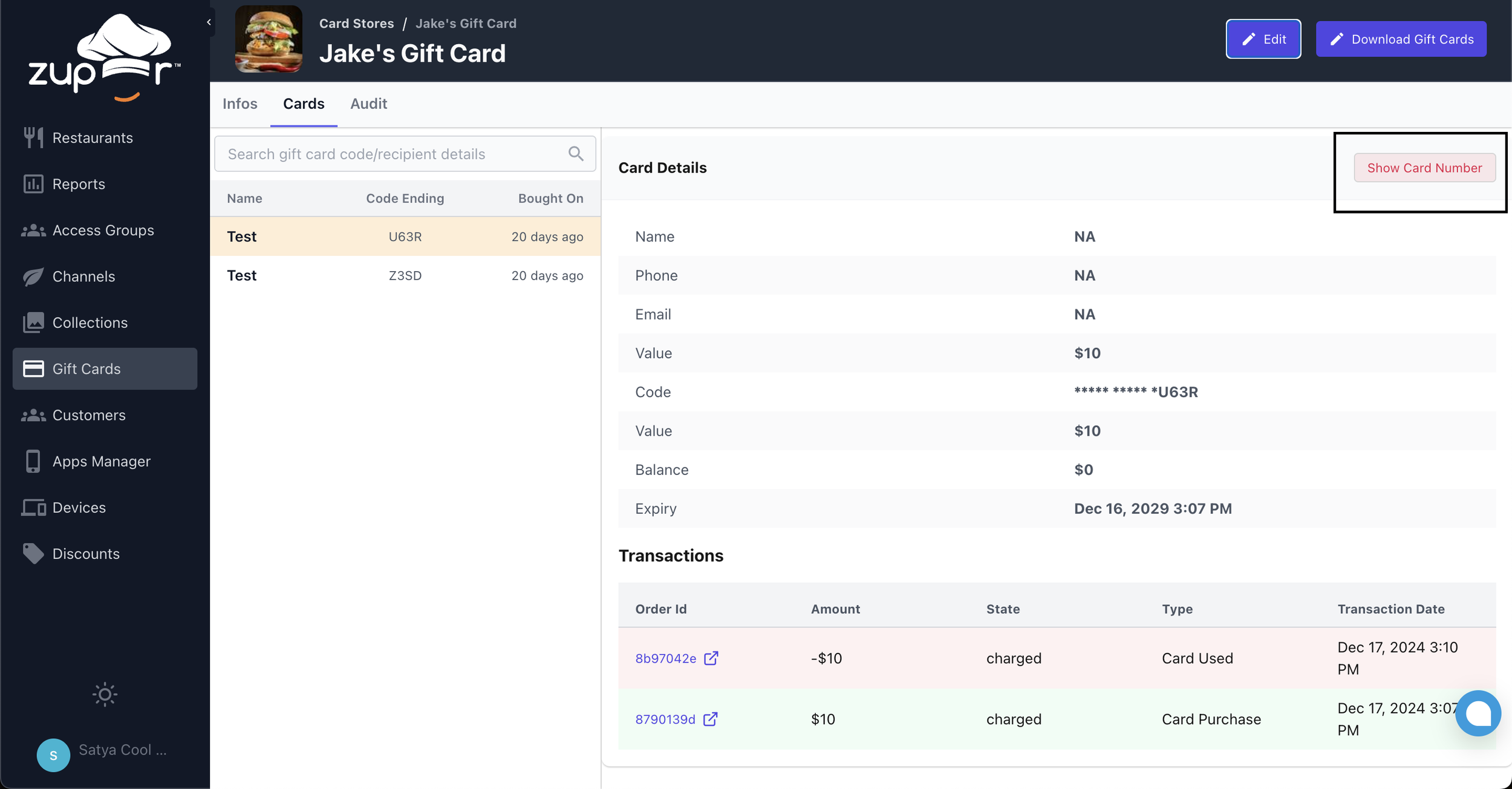
View Customers’ Gift Card Details: Gift Card admins like you can securely access customers’ purchased card details.
Dynamic Loyalty Prompts & Seamless Rewards
Engaging guests and rewarding loyal diners is now easier than ever. This update introduces high-visibility loyalty touchpoints directly across the ordering flow—from menu exploration to post-checkout—driving sign-ups and keeping rewards top-of-mind for every user.
Why it matters
Higher Program Adoption: Prominent banners and menu tiles actively nudge guest users to sign up, turning one-time diners into long-term loyalists.
Post-Order Conversion: Allows guests to create an account after checkout without losing the points earned on that transaction.
Transparent Diner Experience: Gives signed-in users real-time visibility into their point balances, earnings, and rewards at every step without redundant calls-to-action.
How it works
For Guest Users:
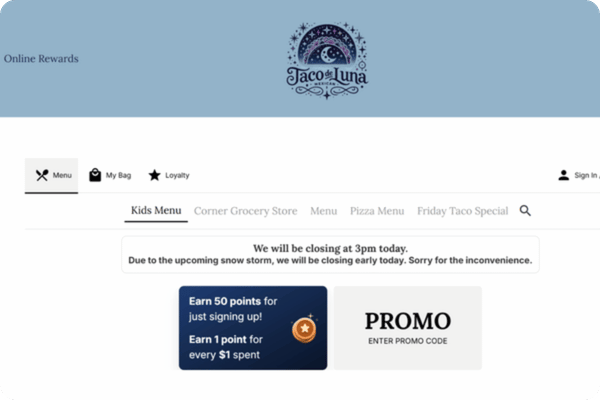
Discounts Section Tile: Displays base and bonus points right on the menu, linking directly to the sign-in/sign-up flow.
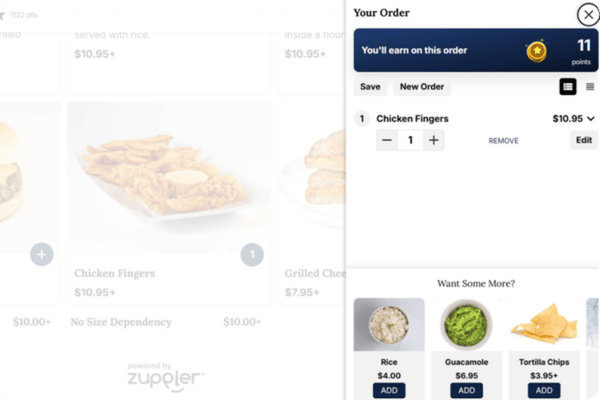
Cart Banner: Displays exact points earnable on the current order at the top of the cart, prompting instant account creation.
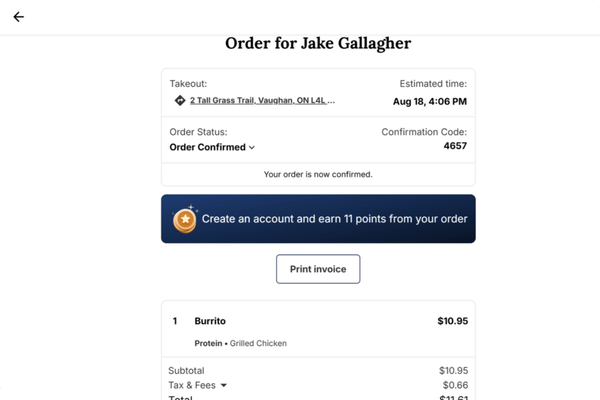
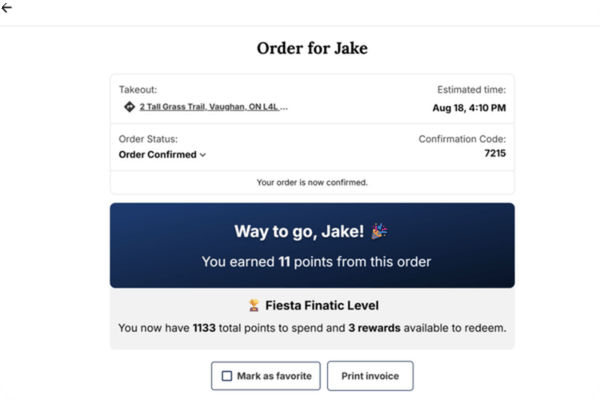
Post-Order Reward Retrieval: A checkout confirmation banner lets guests create an account post-purchase and automatically claims the points from that order.
For Signed-In Users:
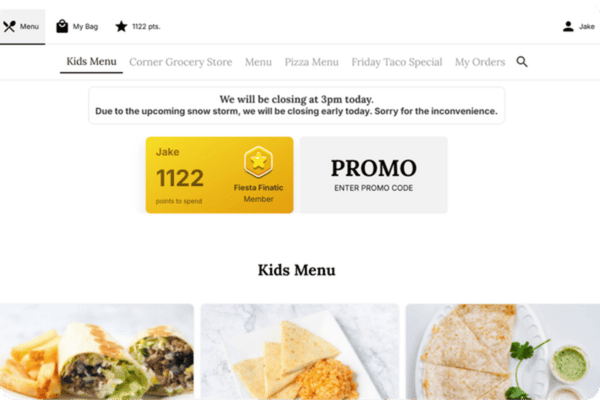
Personalized Menu Tile: Highlights the diner's name and live point balance, linking straight to their loyalty dashboard.
Real-Time Cart & Checkout Summary: Displays exact points earned on the active order along with current tier status and available rewards.
Passwordless Login for Zuppler Chef
Logging into Chef is now faster and more secure. This update introduces Passwordless Login, allowing users to log in instantly using just their phone number and eliminating the friction of remembering passwords.
Why it matters
Frictionless Access: Speeds up daily operations for kitchen staff by removing the hassle of forgotten passwords and reset links.
Enhanced Security: Two-factor phone verification keeps account access secure without complicating the user experience.
How it works
One-Tap Phone Login: Access your Chef account quickly using your verified phone number instead of a password.
Dual-Verification for New Users: New accounts verify both email and phone number at sign-up, allowing either to be used for future logins.
Seamless Existing User Upgrades: Current users will be prompted to verify their phone number on their next email login, instantly unlocking passwordless access for the future.
Automated Self-Serve Onboarding
This release introduces powerful AI-driven automation to our onboarding process, making it highly self-sufficient for restaurant owners to go live with their digital stores and significantly reducing setup time.
Why it matters
Faster Time-to-Live: Automation slashes the manual data entry required to launch a store, getting restaurants open for business in record time.
Reduced Friction: Empowers clients with a seamless, self-guided setup wizard that eliminates the traditional bottleneck of waiting for manual configurations.
Eliminates Setup Stress: Pre-configured default settings ensure kitchens are ready to accept pickup and delivery orders the second they launch.
How it works
Google Profile Sync: Simply enter the restaurant's name, and the system automatically pulls its address, hours of operation, timezone, cuisine type, and owner contact details directly from Google.
Smart Default Setup: Accounts are instantly configured with industry standards right out of the box, including a 15-minute prep time, ASAP/Scheduled ordering, and integrated DoorDash fulfillment delivery.
AI Menu Scraping: Clients can instantly generate their menu by simply pasting a link from delivery apps (DoorDash, UberEats, Grubhub) or uploading a file (PDF, JPEG, PNG, WebP).
Note for Success: While the menu importer captures core items, we recommend clients do a quick final review to manually add any specific modifiers (like topping choices) that may not have been fully detailed on flat PDFs or link scrapes.
Fast Checkout + Digital Wallets
Offer your customers a friction-free ordering flow that cuts out mandatory log-ins, eliminates extra screens, and offers instant, one-click payments tailored to modern dining habits.
Why it matters
Capture Modern Spenders: Digital wallets drive over 53% of global online purchases (and 82% for Gen Z). Offering a Virtual Wallet puts your store directly in line with how today's customers want to pay.
Stop Cart Abandonment: Forcing customers to type in long credit card numbers or passwords right before paying causes them to leave. One-click mobile wallets keep hungry customers moving forward.
Faster Checkout Times: Combining a single payment page with one-click device validation means customers go from a craving to a placed order in seconds.
Flexible Setup: Virtual wallets layer into your system seamlessly, working right alongside your existing credit card processor.
How it works:
Frictionless Guest Checkout: Customers can order instantly without being forced to sign in or create an account.
Enhanced "My Cart" View: A clean, slide-out cart (desktop) or full-page view (mobile) that neatly houses order details and upsells.
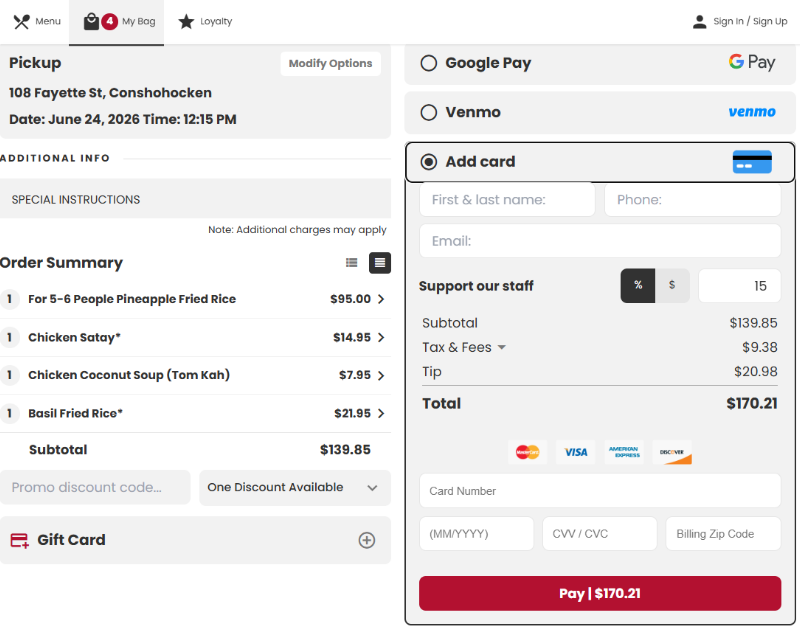
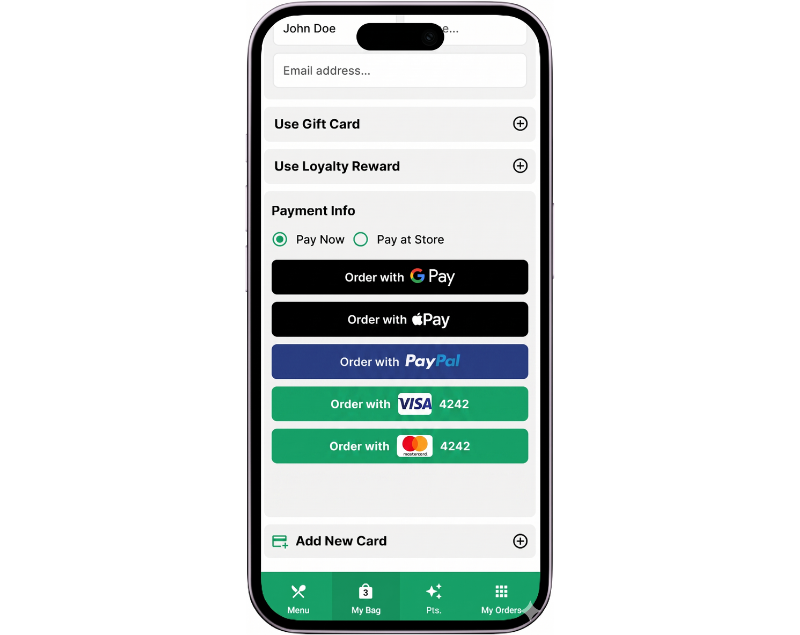
Single-Screen Checkout: Combines the order summary and payment steps onto one screen to eliminate extra clicks.
Instant Wallet Payments: Lets users check out safely in seconds using Apple Pay, Google Pay, Venmo.
Pizza Modifiers
Empower customers with precise half-and-half and portion-controlled toppings, while securing restaurant margins through automated, accurate upcharges.
Why it matters
Increased Check Sizes: Up-selling prompts for premium crusts and extra toppings help capture larger average orders.
Protected Profit Margins: Automates exact pricing for complex orders so restaurants never give away free ingredients.
Fewer Kitchen Errors: Replaces confusing phone orders with clear, standardized digital tickets, reducing food waste.
Frictionless Experience: Offers an intuitive, visual builder that prevents customer frustration.
How it works
Fractional Toppings: Allows customers to easily assign toppings to the whole pizza, or just the left or right halves.
Portion Control: Gives guests flexibility to specify ingredient amounts (e.g., Light, Normal, or Extra).
Automated Upcharges: Instantly calculates accurate pricing based on size, fractional toppings, and portion scales.
"My Orders" Tab on the Menu
We’ve introduced a “My Orders” tab to the menu, giving customers direct access to their past orders.
Why it matters
This update makes past orders easily accessible, improving customer experience and reducing the number of clicks needed to reorder favorite items. Customers no longer need to navigate to their profile to find stored orders.
How it works
The “My Orders” tab is now available on the online ordering menu.
Customers can easily access past orders and reorder favorites with a single click.
It offers a more personalized experience tailored to customer preferences.

Smart Upsell is Now on Chef
The popular Smart Upsell feature is now available directly in Chef, making it easier than ever to boost average check sizes.
Why it matters
We’re continuing to migrate all features to Zuppler Chef, ensuring everything can be managed in one place. Now, restaurants can configure Smart Upsell within Chef to boost revenue effortlessly.
How it works
Enable item recommendations that dynamically adjust based on ordering patterns.
Configure the criteria for data collection and analyze upsell suggestions in this section.
Easily activate this feature from the Chef dashboard via the configuration panel on the right-hand side.


Bulk Assign Images
Assigning images to menu items and modifiers is now a breeze with our new bulk image assignment feature in Chef.
Why it matters
This update simplifies the process of adding images to your menu with a searchable interface. With bulk image assignment, you can add the same image to multiple menu items at once, saving time and effort when updating large menus.
How it works
Select the picture collection that contains the images you need to assign.
The list of images in that collection will be visible.
Use the search box against each image to find the menu item or ingredient to assign the image to.
Additional tips about this functionality are available on the same screen.
Note: This feature is not available for locked POS menus that support passing images to Zuppler.

Menu Previews from Chef
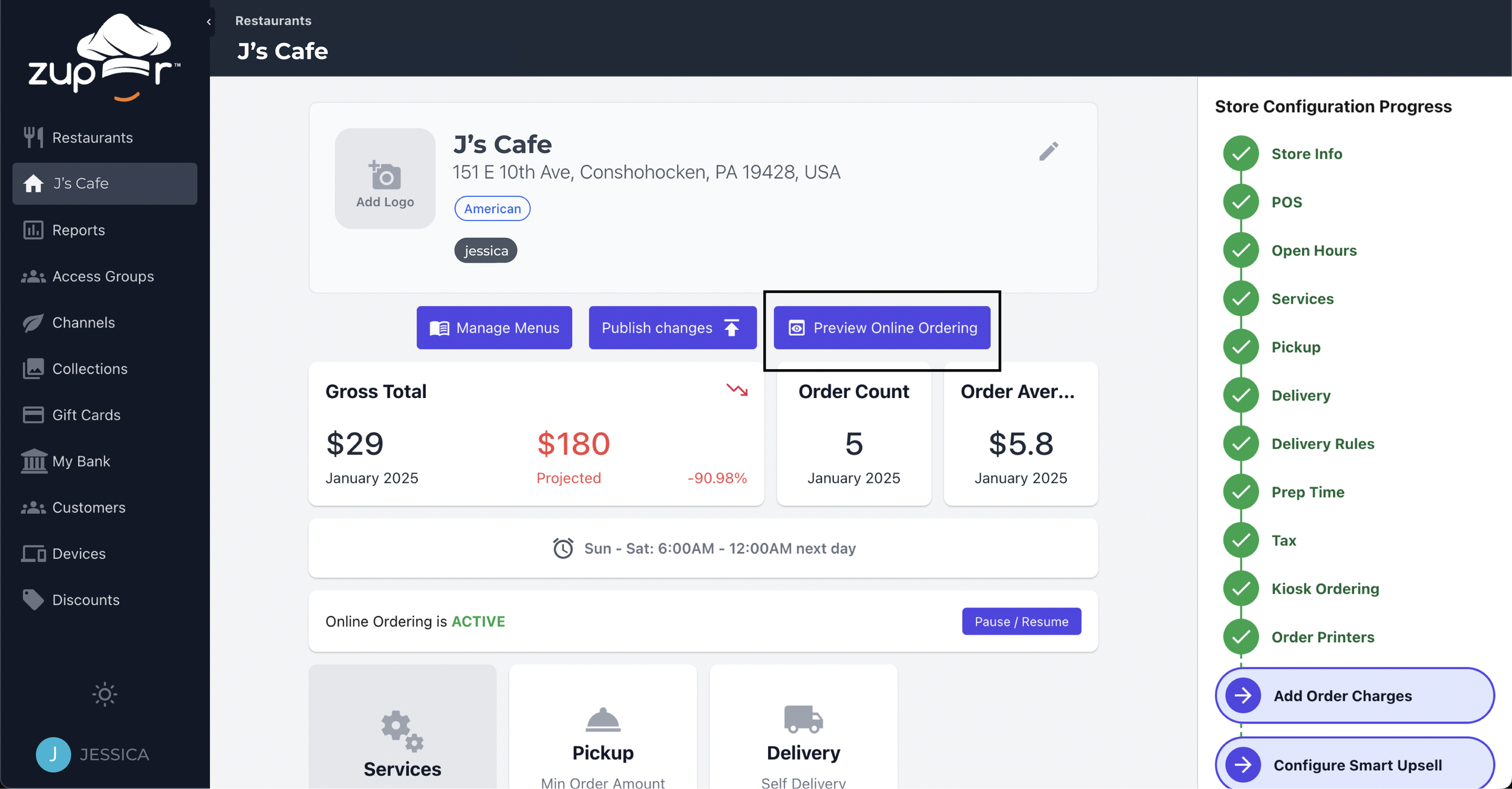
You can preview your online ordering menu directly from the Chef profile page.
Why it matters
Bringing this feature into Zuppler Chef eliminates the need to switch between platforms, providing a seamless way to preview menus as customers see them.
How it works
The “Preview Online Ordering” option is available in Chef and can be accessed from the profile page of a store.
Clicking on it will redirect users to an external preview of the menu as it appears to customers.
Easily make menu updates and instantly review changes.
Item-Level Tax Configuration on Chef
We’ve added the ability to define and assign custom tax rates at the item level for ultimate profitability.
Why it matters
Migrating this feature to Chef is part of our effort to consolidate all features and settings in one place, eliminating the need to switch between platforms, saving you time and effort.
How it works
Custom tax rates can be defined in the Tax section of a Chef profile.
Assign these tax rates at the menu level from the 'Tax Configuration' section of the Chef menu editor.
Tailor tax configurations to specific menu items, categories, or entire menus.


View Gift Card Details
You and your employees with admin rights can securely view customers’ purchased card details, ensuring better management of gift cards.
Why it matters
This update allows restaurant owners and admins like you more transparency and control while helping you serve your guests better.
How it works
Gift card details can be accessed from the “Cards” section under the Gift Cards tab.
When a user accesses the details, the event will be logged for security purposes.
Note: Gift card details should only be shared with the rightful owner of the card.

These updates are designed to make running your restaurant easier and more efficient, while improving the ordering experience for your customers. We’re excited for you and your customers to try them out!
Stay tuned for more updates in the coming days!